
WP-Care Basic
Vulnerability monitoring for up to 5 WordPress sites
- 5 Sites monitored
- Daily Scan frequency
- Included Email alerts
- PDF Security reports
- Included External scan
- Included HostGrap plugin
- Self-service Client area
- Same price Renewal
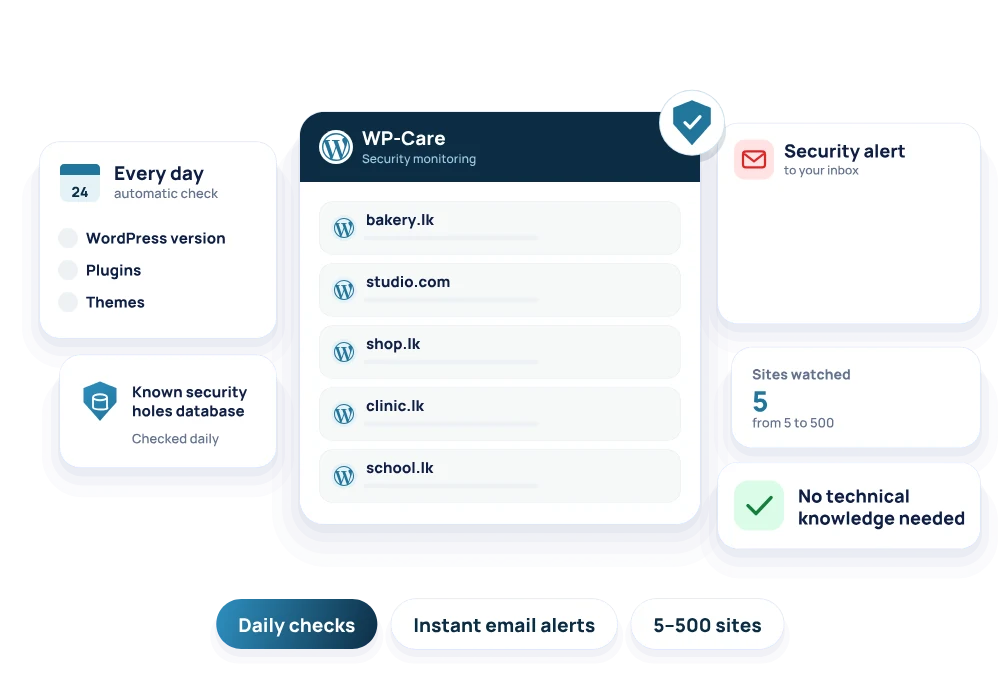
WP-Care is WordPress security monitoring from HostGrap, from LKR 1,500 a month. Every day it checks your WordPress version, plugins and themes against a database of known security holes, and emails you the moment one affects your site, with how serious it is and exactly what to update. Watch from 5 to 500 WordPress sites, with no technical knowledge needed.
Daily vulnerability scans for your WordPress sites, with email alerts.
Vulnerability monitoring for up to 5 WordPress sites
Vulnerability monitoring for up to 30 WordPress sites
Vulnerability monitoring for up to 100 WordPress sites
Vulnerability monitoring for up to 500 WordPress sites
| Feature | WP-Care Basic | WP-Care Advanced | WP-Care Pro | WP-Care Ultra |
|---|---|---|---|---|
| Monthly price | LKR 1,500 | LKR 3,000 | LKR 5,000 | LKR 10,000 |
| Yearly price | LKR 10,000 | LKR 18,000 | LKR 30,000 | LKR 60,000 |
| Sites monitored | 5 | 30 | 100 | 500 |
| Scan frequency | Daily | Daily | Daily | Daily |
| Email alerts | Included | Included | Included | Included |
| Security reports | ||||
| External scan | Included | Included | Included | Included |
| HostGrap plugin | Included | Included | Included | Included |
| Client area | Self-service | Self-service | Self-service | Self-service |
| Renewal | Same price | Same price | Same price | Same price |
WP-Care is a WordPress security monitoring service from HostGrap. It keeps a constant watch on your WordPress websites and tells you as soon as a known security hole appears in your plugins, your themes or WordPress itself, so you can fix it before attackers use it.
You do not need to read security news or understand how attacks work. WP-Care checks your sites every day and sends you a plain-English message that says what is at risk, how serious it is and what to update. It suits website owners, small businesses, freelancers and agencies who look after one or many WordPress sites.
Outdated plugins and themes are the most common reason WordPress sites get hacked. When a security hole is found in a plugin, the details often become public, and attackers start looking for websites that still run the old version. The same out-of-date code is also a common cause of sudden white screens and errors.
The result can be a hacked website, lost data, a site that is down for days, or a warning in search results that keeps visitors away. Most of this can be avoided by updating the right plugin at the right time, and WP-Care tells you which one and when.
WP-Care compares everything running on your site with a live database of known WordPress vulnerabilities, which is updated every day from global security sources. You can choose between two ways of checking your site.
The external scan needs no setup. We look at your site from the outside, like a visitor, and detect your WordPress version, plugins and themes. Nothing is installed on your site, and the scan can still read your site's files when the site is showing errors. For the most accurate results, install our lightweight HostGrap WordPress plugin, which reads the exact version of every plugin, theme and WordPress itself, including plugins that are not visible from the outside, and works even behind a firewall, a CDN or a login page.
Yes. The HostGrap plugin only sends the version numbers of WordPress, your plugins and your themes. It never sends your content, your files, your customers' data or your passwords.
If you would rather not install anything, the external scan works on its own. You can start with it and add the plugin later, for example when you want WP-Care to see plugins that are hidden from the outside.
Every plan checks your sites every day, so a new security hole is caught within a day, not months later. As soon as WP-Care finds an issue, it sends you an email alert.
Each alert names the plugin, theme or WordPress version that is affected, how serious the issue is, and what you should do, such as updating to a fixed version or turning a plugin off until a fix is released. You get a clear next step instead of a list of technical warnings.
Every scan produces a clean report that rates each issue as critical, high, medium or low. Each issue shows the affected plugin, theme or WordPress version, its CVE reference, and the fix, so you or your developer know exactly what to do first.
You can download each report as a PDF. That makes it easy to keep a record, share it with a client or a developer, or show that a website is being checked for security problems every day.
You manage WP-Care from your HostGrap account. Add your domains, run a scan whenever you like, download the WordPress plugin and view your reports, all in one place.
If you look after websites for clients, you can keep every site on one plan and check them all from the same client area, instead of logging in to each WordPress dashboard one by one.
WP-Care starts at LKR 1,500 a month. Every plan includes daily scans and email alerts, and the plans differ only in how many WordPress sites we watch for you, from 5 to 500. Prices are in Sri Lankan rupees.
You can pay monthly, every 3 months, every 6 months or yearly. The longer you pay for, the less each month costs, with up to half off when you pay yearly, and your plan renews at the same price.
Count the WordPress sites you want us to watch. WP-Care Basic covers up to 5 sites, which suits a business with a few websites or a freelancer with a handful of clients. WP-Care Advanced covers up to 30 sites, for growing agencies.
WP-Care Pro covers up to 100 sites and WP-Care Ultra up to 500 sites, for agencies, hosting companies and teams that look after many WordPress websites. Every plan has the same daily checks, alerts and reports.
WP-Care finds the problems and tells you exactly how to fix them, but it does not change anything on your site by itself. You stay in control of every update, which matters because an update can sometimes change how a plugin or theme works.
Most fixes are a simple update in your WordPress dashboard. If your site is hosted on HostGrap WordPress hosting, WP Toolkit lets you update WordPress, themes and plugins in one place, and our daily and weekly backups give you a safe way back if an update goes wrong.
New security holes are caught fast
With the severity and what to do
Each issue rated, with its CVE and the fix
Nothing to install on your site
Exact versions, even behind a firewall
Never your content, files or passwords
Add sites and run a scan any time
No price jump after the first term
HostGrap AI at any hour, and our team every day
Still have a question?Our team answers on WhatsApp and by phone.
Chat on WhatsAppWP-Care is a WordPress security monitoring service from HostGrap. It checks your WordPress version, plugins and themes every day against a database of known vulnerabilities and emails you when one affects your site, with what to update.
WP-Care starts at LKR 1,500 a month. You can pay monthly, every 3 months, every 6 months or yearly, with up to half off when you pay yearly, and your plan renews at the same price.
WP-Care Basic watches up to 5 sites, Advanced up to 30, Pro up to 100 and Ultra up to 500.
Every day. Every plan includes daily automatic checks, and you can also run a scan yourself at any time from your client area.
No. The external scan works with nothing installed on your site. For the most accurate results, you can install the lightweight HostGrap plugin, which reads the exact version of every plugin and theme.
Only the version numbers of WordPress, your plugins and your themes. It never sends your content, files or passwords.
Each issue is rated critical, high, medium or low, with the affected plugin, theme or WordPress version, its CVE reference and the fix. You can download the report as a PDF.
No. WP-Care finds the problems and tells you exactly what to update, and you stay in control of every change on your site.
You can pay by credit or debit card, or by bank transfer, monthly, every 3 months, every 6 months or yearly. Prices are shown in Sri Lankan rupees.
Tell HostGrap AI what you need and it suggests the right plan, at any hour.